
WISPGate Automation & Workflow Engine

Process Orchestration Across Billing, CRM, OSS & Network

WISPGate’s Automation Module is not just “if-this-then-that.” It is a configurable orchestration layer that allows operators to design end-to-end operational logic across billing, CRM, support, OSS, and network monitoring—without writing code.
At the core is a Workflow Builder combined with a dynamic Notification Engine, extensible Custom Fields, and programmable credit mechanisms such as Gift Cards.

Automation Architecture Overview

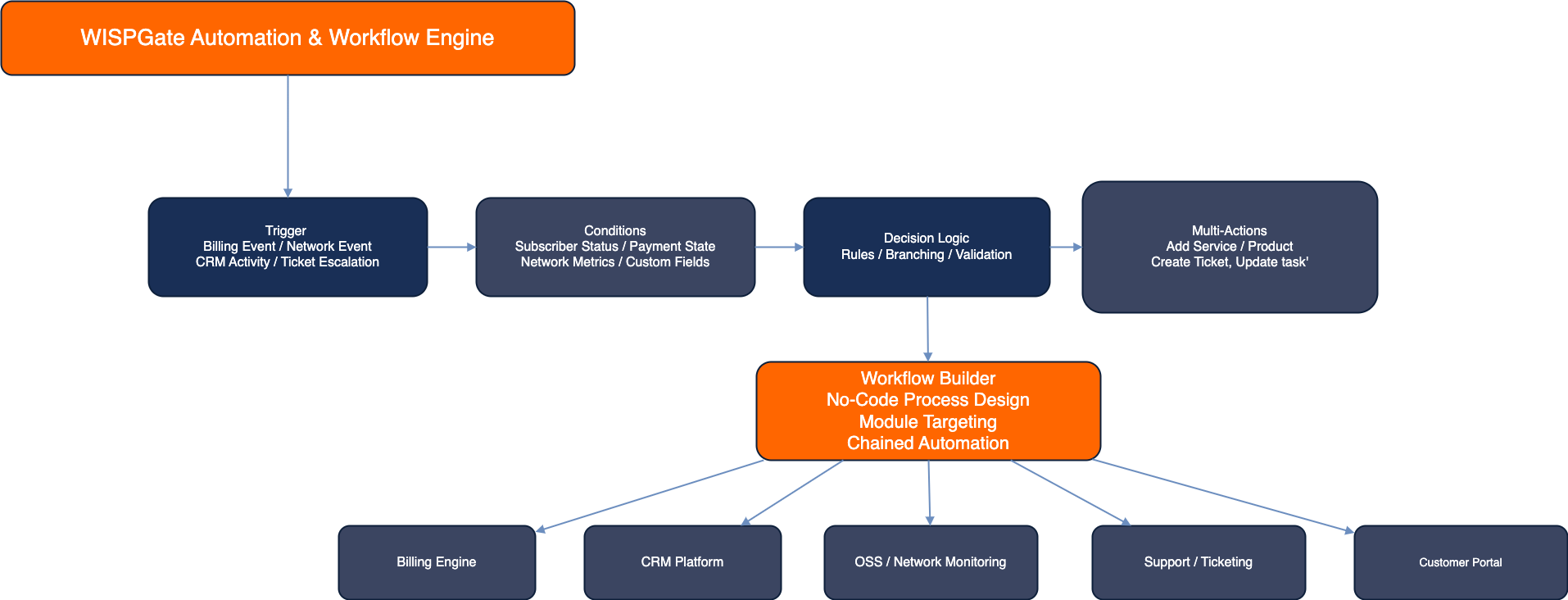
WISPGate Automation Workflow Diagram

Logical Structure

Trigger
Conditions
Decision Logic
Multi-Actions
Notifications / Updates

Workflows can target:

  • Billing module
  • Subscriber / Sub-Service
  • Device
  • Ticket
  • Site
  • Lead / Opportunity
  • Network metrics
  • Wallet balance
  • Custom fields

Workflow Builder (Core Engine)

The Workflow Builder allows operators to configure:

  • Target Module
  • Trigger Event
  • Conditions
  • Multi-Step Actions

No scripting required—logic is structured via configuration.

Workflow Design Model

Module Selected
Define Trigger
Add Conditions (AND/OR)
Define Actions
Activate Workflow

Example 1: Billing Suspension Logic

Scenario
Customer invoice becomes overdue for 7 days.
Workflow Design
  • Trigger: Invoice Status = Overdue (7 days)
  • Condition: Subscriber Type = Residential
  • Actions:
    • Change Sub-Service Status to Suspended
    • Apply Restricted RADIUS Profile
    • Send Email Notification
    • Send SMS Reminder
Fully automated. No human intervention.

Example 2: Network Outage Handling

Workflow Design
  • Trigger: Device Status = Offline (via SNMP)
  • Condition: Site Type = PoP
  • Actions:
    • Create Support Ticket
    • Notify NOC Team
    • Send Outage SMS to affected subscribers
    • Log Incident
This connects monitoring directly with CRM and communication.

Multi-Action Capability

Unlike simple automation tools that allow one action, WISPGate supports chained execution.

Multi-Action Example

Trigger: New Subscriber Created

Actions:

  • Generate Welcome Email
  • Create Installation Task (Project Module)
  • Assign Engineer
  • Reserve CPE from Stock
  • Send SMS Appointment Confirmation
This bridges CRM, Operations, Inventory, and Notifications in one flow.

Notification Engine (Dynamic Communication Layer)

The Notification Module works similarly to workflows but focuses on automated communication.

Channels Supported

  • Email
  • SMS
  • Internal alerts

Trigger Sources

  • Billing events
  • Payment confirmations
  • Service activation
  • Suspension
  • Network outage
  • Device offline
  • Ticket status changes
  • Wallet balance updates

Notification Flow

Event Occurs
Notification Rule Check
Template Selection
Dynamic Variable Injection
Send via Channel (Email/SMS)

Example

Invoice generated →

Email subject: "Your Invoice for {{Month}} is Ready"

Body auto-populates:
  • Subscriber name
  • Invoice amount
  • Due date
  • Payment link

Custom Fields (System Extensibility)

Custom Fields allow operators to create flexible data structures without modifying core code.

Supported Types

  • Text
  • Dropdown
  • Numeric
  • Boolean
  • Date
  • Conditional fields

Use Cases

  • Regulatory ID fields
  • Regional compliance flags
  • Installation notes
  • Service priority tier
  • Internal classification tags
These fields can then be used inside:
  • Workflow conditions
  • Notification logic
  • Reporting filters
  • Sales pipelines

Gift Card & Wallet Credit Automation

WISPGate includes wallet management with automation support.

Gift Card Generation

  • Create predefined or dynamic value cards
  • Assign to subscribers
  • Add credit to wallet balance

Workflow Example

  • Trigger: Campaign Code Applied
  • Condition: Subscriber Region = Nairobi
  • Action:
    • Generate $10 Credit Gift Card
    • Apply to Wallet
    • Send SMS Confirmation
This enables:
  • Promotional campaigns
  • Retention bonuses
  • Compensation credits
  • Referral rewards

End-to-End Automation Scenarios

Scenario 1: Full Service Lifecycle Automation

Lead Converted to Subscriber
Create Sub-Service
Reserve Device from Stock
Create Installation Task
Notify Customer
Upon Activation → Send Welcome Email
Start Billing Cycle
Zero manual coordination required across departments.

Scenario 2: Disaster Mode Override (Integrated with AAA)

  • Trigger: Region = Affected by Outage
  • Action:
    • Activate Static Mode Policy (AAA)
    • Remove Shaping Limits
    • Notify Customers
    • Log Operational Event
Automation can interact with policy engines.

Scenario 3: HR & Payroll Automation

  • Trigger: Attendance < 20 days
  • Condition: Employee Type = Full-time
  • Action:
    • Flag HR Review
    • Notify Manager
Automation is not limited to customer-facing processes.

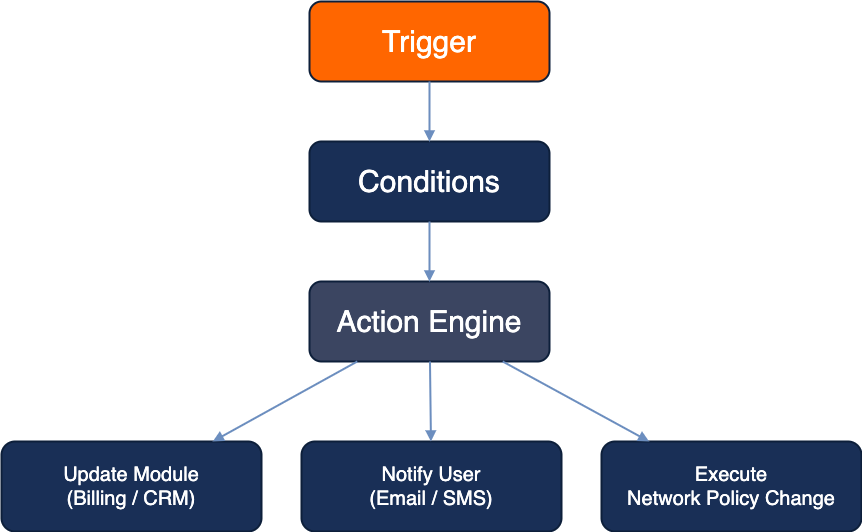
Automation Control Flow Diagram

WISPGate Automation Control Diagram

Strategic Strength

Most ISP platforms offer:

  • Basic scheduled tasks
  • Limited email triggers
  • Static event alerts

WISPGate offers:

  • ✓ Multi-module orchestration
  • ✓ Conditional logic with AND/OR
  • ✓ Chained actions
  • ✓ Network-triggered automation
  • ✓ Billing-triggered enforcement
  • ✓ Campaign-based credit logic
  • ✓ Custom-field extensibility
  • ✓ Cross-department process automation

Why This Matters

Automation is not about convenience.
It is about:
  • Reducing human error
  • Enforcing policy consistency
  • Increasing operational speed
  • Scaling without increasing headcount
  • Protecting revenue
  • Improving customer experience
WISPGate Automation transforms the system from a passive management tool into an active operational engine that executes business logic in real time.