WISPGate Customer Portal

Secure Self-Service. Full Transparency. Zero Dependency on Manual Support.

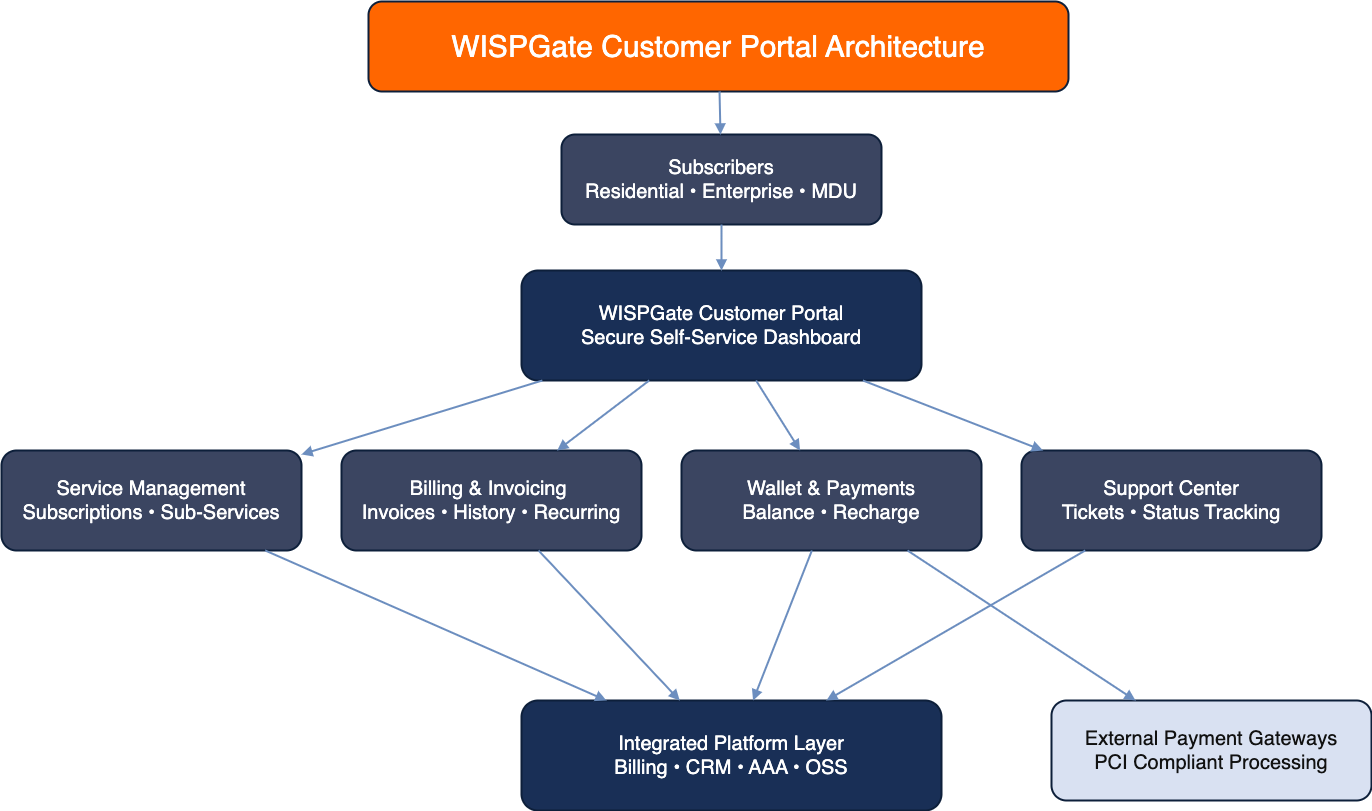
The WISPGate Customer Portal is a comprehensive self-service platform that allows subscribers β€” whether residential, enterprise, or MDU-based β€” to manage their services, billing, wallet, payments, and support interactions independently.
It is tightly integrated with Billing, CRM, AAA, OSS, and Payment Gateways, while maintaining PCI compliance through external payment processors.

Portal Architecture Overview

WISPGate Customer Portal Architecture Diagram

Logical Structure

Customer (Web / Mobile Browser) WISPGate Portal UI Billing CRM Wallet Ticketing AAA Payment Gateway (PCI handled externally)
The portal is not isolated β€” it directly reflects real-time data from the core system.

Subscriber Visibility Model (MDU-Ready)

WISPGate supports a multi-service structure where:

  • 1 Subscriber
  • Multiple Sub-Services
  • Each Sub-Service may include:
    • Main Service (Internet / IPTV / VoIP)
    • Add-ons
    • CPE devices
    • Installments

    Portal Hierarchy View

    Subscriber Dashboard
       β”œβ”€β”€ Sub-Service A (Internet – Apt 101)
       β”‚      β”œβ”€β”€ Status
       β”‚      β”œβ”€β”€ Speed/Profile
       β”‚      β”œβ”€β”€ Devices
       β”‚      └── Billing
       β”œβ”€β”€ Sub-Service B (IPTV)
       └── Sub-Service C (VoIP – Office)
                    
    This ensures complete transparency across multi-unit or multi-service customers.

Billing & Invoice Management

Customers can:

  • View open invoices
  • View paid invoices
  • Download invoice PDFs
  • See due dates
  • Monitor billing cycles
  • Track installment progress

Invoice Payment Flow

Customer Clicks "Pay Invoice"
↓
Redirect to Payment Gateway
↓
Customer Completes Payment
↓
Gateway Sends Webhook to WISPGate
↓
Invoice Marked Paid
↓
Service Reactivated (if suspended)
↓
Confirmation Displayed
Payment confirmation is automatic. No manual reconciliation required.

Wallet Management

The Customer Wallet acts as a prepaid balance layer.

Customers can:

  • View wallet balance
  • Add funds
  • See transaction history
  • Apply wallet balance to invoices

Wallet Top-Up Flow

Click "Recharge Wallet"
↓
Enter Amount
↓
Redirect to Gateway
↓
Payment Success
↓
Wallet Balance Updated
↓
Notification Sent
Wallet can also receive
  • Promotional credits
  • Gift cards
  • Compensation adjustments

Recurring Billing & Card Registration

Customers can securely add a credit card for recurring payments

Important:

  • WISPGate does NOT store card data.
  • PCI compliance is fully handled by integrated payment gateways.
  • Tokenization is used for recurring billing.

Recurring Payment Flow

Customer Adds Card
↓
Card Token Stored via Gateway
↓
Recurring Billing Date
↓
Gateway Charges Card
↓
Payment Webhook to WISPGate
↓
Invoice Settled Automatically
This ensures compliance and security without operational risk.

Service Status & Real-Time Updates

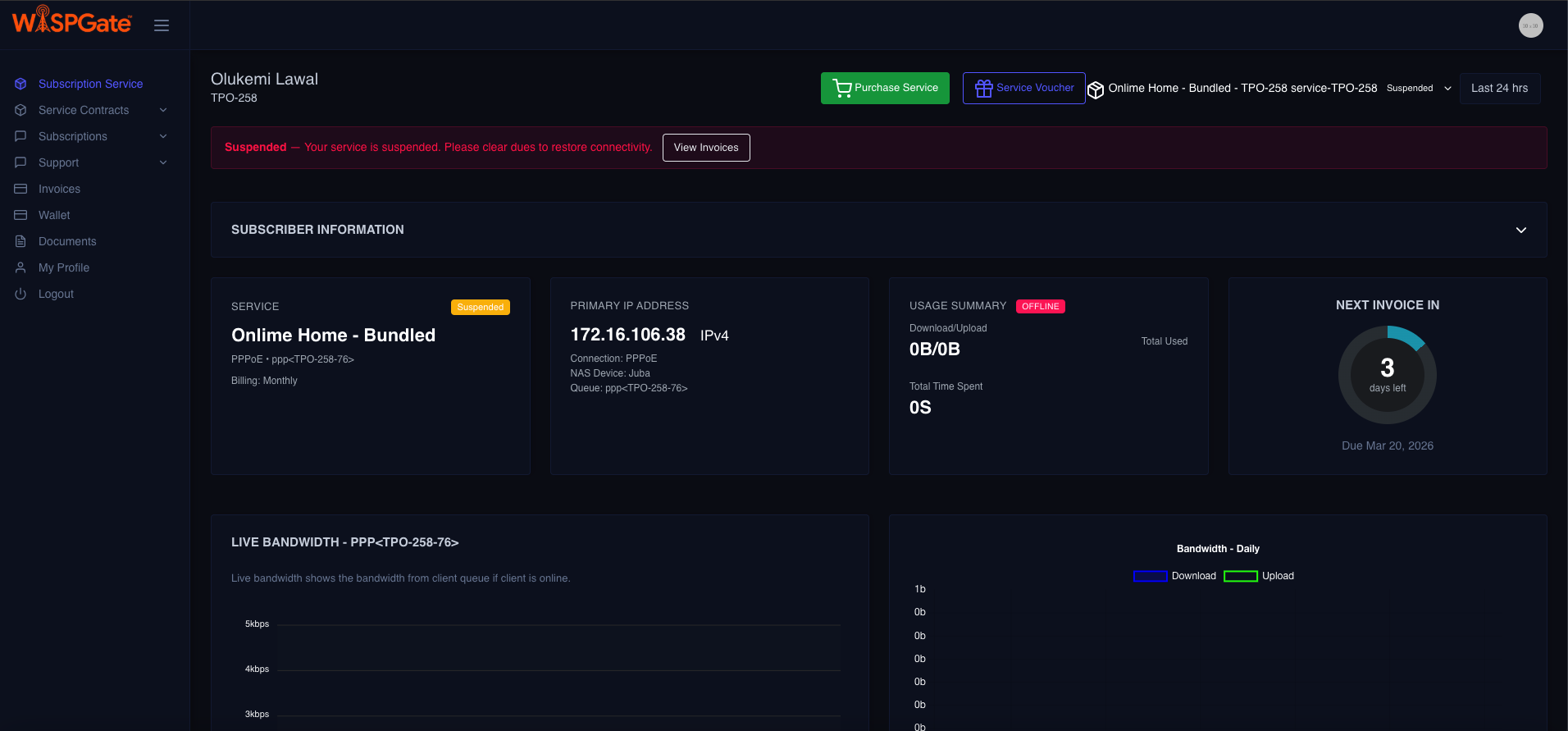
Portal displays:

  • Service status (Active / Suspended / Restricted)
  • Bandwidth profile (if applicable)
  • Usage metrics (where integrated)
  • Device information
  • Expiry dates (for prepaid or installment-based models)

Because the portal is connected directly to:

  • AAA
  • Billing
  • Device Module
  • OSS (for device and usage data)

Data is real-time, not cached snapshots.

Support & Ticketing

Customers can:

  • Open tickets
  • Select issue category
  • Attach files
  • Track status
  • View SLA progress
  • Respond to support updates

Ticket Workflow

Customer Submits Ticket
↓
Ticket Created in CRM
↓
Assigned to Support Queue
↓
Support Responds
↓
Customer Receives Portal + Email Notification
↓
Resolution / Closure
All ticket interactions are logged and visible in the portal.

Multi-Service Control

In MDU or enterprise environments, a customer may manage:

  • Multiple apartments
  • Multiple offices
  • Multiple branches
  • Mixed services (Internet + IPTV + VoIP)

The portal provides:

  • Aggregated financial view
  • Per-sub-service breakdown
  • Consolidated invoice visibility
  • Unified wallet control

Security Model

Security measures include:

  • Role-based portal access
  • Encrypted communication (HTTPS)
  • Payment tokenization
  • PCI compliance via gateways
  • Access logs
  • Session control
Sensitive financial data is never stored within the core platform.

End-to-End Example Scenario

Example: Residential Customer

  • Customer logs in.
  • Sees Internet and IPTV services.
  • Notices invoice due.
  • Pays invoice online.
  • Service auto-confirms as active.
  • Adds credit card for recurring billing.
  • Later opens ticket for WiFi issue.
All actions happen without calling support.

Example: Enterprise Customer

  • Enterprise logs in.
  • Sees 5 branch services.
  • Downloads consolidated invoice.
  • Wallet has credit from previous overpayment.

Strategic Advantages

Most ISP portals:

  • Show invoices only
  • Require manual activation after payment
  • Lack wallet integration
  • Do not support multi-service visibility
  • Store card data insecurely

WISPGate Portal provides:

  • βœ” Multi-service dashboard
  • βœ” Real-time billing status
  • βœ” Wallet + gift card support
  • βœ” Secure recurring billing (PCI via gateway)
  • βœ” Integrated ticketing
  • βœ” MDU-ready visibility
  • βœ” Automated service reactivation
  • βœ” Complete transparency

Business Impact

The Customer Portal reduces:
  • Support calls
  • Finance workload
  • Manual reconciliation
  • Payment delays
  • Service reactivation delays
It increases:
  • Customer satisfaction
  • On-time payments
  • Operational efficiency
  • Trust through transparency
  • Scalability without headcount growth
Customer Portal Screenshot